980qc

My Blogger TricksAll Blogger TricksAll Blogging Tips

Contact me

hackercrackerblog@gmail.com
Powered by Blogger.

VOTE FOR MYBLOG

Subscribe to sms alerts

CLICK Shuffle Icon below to get a random post

Social Icons

Featured Posts

SCAN THIS QR CODE TO DOWNLOAD BLOG'S ANDRIOD APP OR CLICK DOWNLOAD TO DOWNLOAD TO YOUR PC


pop

My Blogger TricksAll Blogger TricksTechtunes

Join and Earn

Search This Blog

NEW BLOG

addthis

Video Of Day

Text Widget

Followers

Social Icons

Horizontal Post Sample

Popular Posts

Social Icons

LINE Users Can Enjoy FREE TALK TIME Worth Rs.111

LINE Users Can Enjoy FREE TALK TIME Worth Rs.111


LINE is a new and best instant messaging application for all platforms like Android, IOS and Windows. which allows you to make FREE voice calls and send FREE messages whenever and wherever you are, 24 hours a day!
How to get free talktime..:

  1. Download line app according to you platform from below links
  2.        Mobile Platform Users :
           Android Users - Download Link
           Iphone Users - Download Link
           Blackberry Users - Download Link
           Windows Phone Users - Download Link
           Nokia Asha Users - Download Link
           Firefox OS Users - Download Link

        PC Users :
          Windows OS - Download Link
          Windows 8 OS - Download Link
          Mac OS - Download Link
  3. Now you have to do is just chat with your friend and send stickers to them then you will earn points
  4. This offer is valid upto 30th june 2014 on 30th june the points in your account will be converted as the talktime. Enjoy!
Don't forget to follow my blog on networked blogs and like us on facebook


Vodafone free minutes for Delhi-NCR users

Vodafone free minutes for Delhi-NCR users(officially) 

Offer Details :

Vodafone is back again with its surprising offer where they give Free Minutes and SMS to its Delhi User's. 

Just follow the below steps to get Vodafone Free Minutes / SMS for Delhi-NCR User's :
  1. Dial *121*43# from your Vodafone Delhi Mobile Phone
  2. Instantly you will get Free Minutes displayed on screen
  3. SMS will be send by Vodafone about the details
  4. Free Minutes may varry for different different number
Note :
Even If you Have availed the offer last month than you can get Free Minutes again.
This offer works only with few users. 
If you like this post follow my blog on networked blogs and like us on facebook

Premium Blogger Templates - Metro Modern Solar V.1

Premium Blogger Templates - Metro Modern Solar V.1

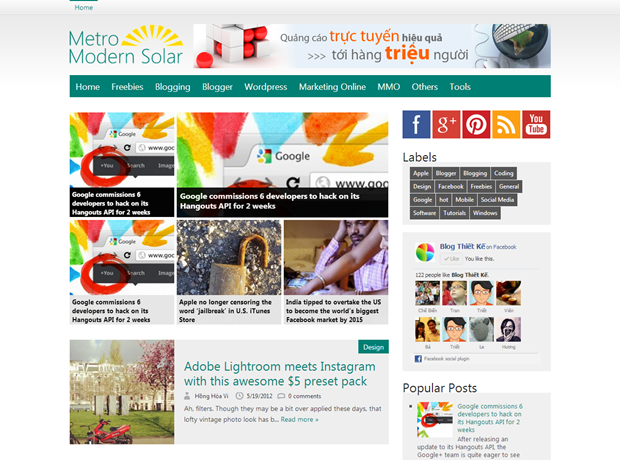
Blogger Templates Metro Modern Solar is the latest in the line of his Metro UI templates that this is the Modern UI. Metro Modern Solar uses turquoise gray tones and subtle elegance. Suitable for individual pages and pages technology news magazine.
Be inspired by Windows 8's Metro interface and inherits the characteristics of BTK Metro, Metro Simple. Metro Modern However there are also distinctions are dedicated to improve it.
Premium Blogger Templates - Metro Modern Solar V.1

1. Customize the Menu Bar multilevel

Tùy chỉnh thanh Menu Bar đa cấp
Metro Modern Solar owns a multi-level bar Menu Bar along with a very nice effect. Depending on demand you can upgrade to 4 levels. To customize the menu in the Template - Edit HTML - Proceed you find the following code and arbitrary edits.


Note: The bar menu bar often repeat structure. Readers should note carefully read the code carefully.

2. Featured Posts WidgetFeatured Posts Widget
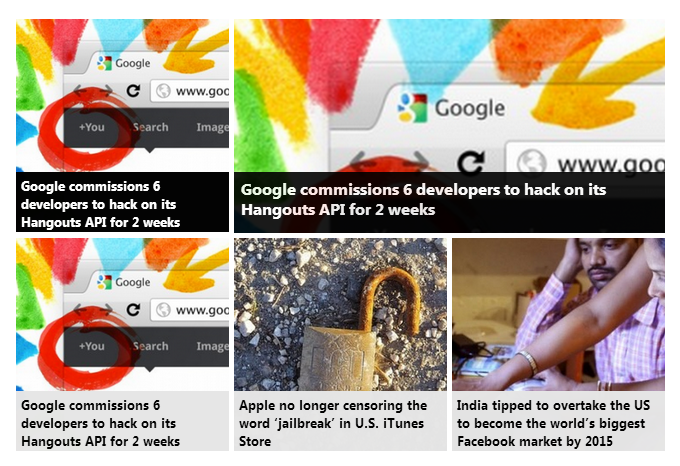
Feature Post widget to display what you need to do next.
b1) Find the Bloglist widget click Edit Feature name it
b2) Mark accurate check on the following 2 lines
  • Title of most recent item
  • Thumbnail of most recent item
b3) Click Add to list to add links into Bloglist. Having all 4 articles so you need to add the following links exactly 4.
 http://hackncrack007.tk/feeds/posts/default/-/hot?start-index=1
http://
hackncrack007.tk/feeds/posts/default/-/hot?start-index=2
http://
hackncrack007.tk/feeds/posts/default/-/hot?start-index=3
http://
hackncrack007.tk/feeds/posts/default/-/hot?start-index=4

3. Carousel Slider Widget

Carousel Slider Widget
Carousel Slider Widget displays only when you see any article. To customize this widget on yourTemplate - Edit HTML - Proceed you find the following code and arbitrary edits.
Meaning of parameters
- label1 = "hot” - instead of "hot" by the label that you want to display Carousel Silder
- numposts1 = 15 - instead of 15 with other numbers to customize the number of posts are loading. It is recommended to keep the 15 items.

4. The Metro Social Widgets

Metro Social WidgetFind the underlying code and modify the id name blogthietke your social network.
 

5. Page Navigation automatically

Page Navigation tự động
You go to Template - Edit HTML - Proceed - Expand Widget Templates and find the following code:

var pageNaviConf = {
    perPage: 5,
    numPages: 9,
    firstText: "First",
    lastText: "Last",
    nextText: "Next",
    prevText: "Prev"
}
in which:
- perPage : the number of articles displayed in 1 page
- numPages : Some pages show
- firstText , lastText , nextText , prevText : is the word corresponding to the button show First, Last, Next, Prev 

6. Bottom Navi BarBottom Navi Bar
In Layout you find Bottom Navi HTML widget. Click Edit and then copy all the code, remember to customize your own links.

Blogging         
Blogger.            Wordpress
            Marketing Online              MMO


7. Several other notable characteristics

a) Pagelist: Pagelist will automatically display all static pages at the top of the blog. Want to display your custom Layout - Page to customize.
b) Label Widget in the Sidebar. You need to customize the display format List.
c) Timestamp Format. You go to Settings - Language and custom formatting the Timestamp Format similar in shape
clip_image001[15]

8. Conclusions

Generally this interface basically is "the system" with Simple Metro and Metro BTK however installation is a bit more complicated. This is evident because it has more features. If you find it difficult do not hesitate to leave your comments in this article are willing to help support you a satisfactory templates.


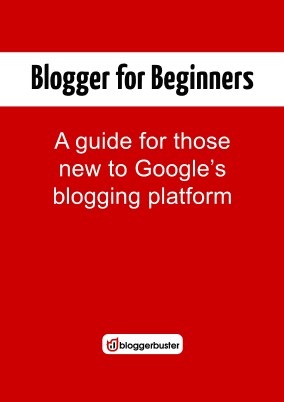
Documentation basic blogging - Blogger for Beginners

Documentation basic blogging - Blogger for Beginners

Tài liệu hướng dẫn viết blog cÆ¡ bản – Blogger for Beginners


The book is Amanda Begginer Blogger for free offers. Blogger Buster editor Amanda is a very famous Blogger; who wrote the book The Blogger Template Book (each is introduced in Blog Design).In the guide book blogging Amanda basic focus on the topic of blogging as basic editing interface, publishing articles. The book also mentions the necessary knowledge about the structure of Blogger. In a nutshell it offers a panorama to be able to capture new job blogging and blogging platform Blogger.

This book is divided into ten chapters:
  1. Start
  2. First Post
  3. Rights and privacy policy
  4. Customize your blob
  5. Gadgets (widgets) and utility layout in Blogger
  6. Comments and connectivity (Backlinks)
  7. Publish and article archives
  8. Share blog content
  9. How to ...
  10. Learn more about Blogger
Although Blogger has provided a vast library of knowledge in the Blogger Help Blogger but knowledge is never enough for everyone. Moreover, this book provides a perspective of an experienced blogger "nostalgically the beginning was" not the perspective of a service provider.Therefore it would be more useful details and lot.
A valuable book for those new soldiers, it is the manner detailed hands-on, step by step. But it is also very useful for your Blogger specializes in supporting and guiding her. It saves time and effort because both will meet each other, rather than hang around with those silly questions of basic categories.
By the way I also recommend you read the new and find out before asking. Want to have not experienced any other way just rolling up your sleeves and be a little dirty mud.
In conclusion Blogger whether professional or just a novice, the book should have basic blogging guidelines - for Begginers Blgoger this in your library. The only hard thing left is a book written entirely in English. You can read online here

Use the HTML5 card rather short code to add music to your website

Use the HTML5


Previously, to add music to your blog will have to use a 3rd party plugin with flash support HTML5 yet born when help for webmasters and content managers who bear much lighter. I remember 2 years ago when Rilwis published articles shortcode perfect to add music to your Blogger website andmade ​​a lot of good bloggers like you catch the gold. But right now the job has become a lot simpler than you may insert music directly into your website with just one card 
Currently card  HTML5 support latest browsers listed here
support
However, as a webmaster you should anticipate some cases may occur as your browser does not support HTML5 (referring to his case extremely annoyed with IE guys - stupid beyond description - sr you) . So this article will guide his plans not negate the status of some HTML5 support older browsers.

1. Simplest syntax

Its syntax is very simple, you just need to insert the card  with few parameters is done.You only need the most basic insert:
   
Properties controls that can display a slider control on the browser. It should be noted that this slider will be different on different browsers. Specifically, the following
controls3

2. Enhance Properties

However, to fully control card , we must learn some important attributes.
scr
It specifies the sound file is played. This property is very familiar sure you also see the most is when inserting images into posts such also have attributes.
controls
As in the above example, this attribute can display a slider control.
autoplay
This attribute will be automatically tracks slightly right when the page loads. Note okay brother, his very hydrophobic case. There are many sites do not bother to read disturb others just because of the background music tracks. If used, they must be sure how the reader can quickly turn off the sound.
loop
Loop. When all the music they play browser will automatically play back the track from the beginning again and again. It is a loop infinity - infinity loop.
preload {auto | metadata | none}
Preload attribute specifies whether or not to download music files. It only FF, Chrome and Safari support.
  • auto = files will be downloaded automatically.
  • just download the file metadata = metadata page load (not really get it!).
  • none = sound file is downloaded only when readers disagree.
See examples for a better understanding of these properties.
   

3. * Support for older browsers

HTML5 is still too new and only some versions of the new browser supports it, for the browser version older people still have to rely on 3rd party plugins operate as jw flash based player. So how to use HTML5 has recently been using flash? HTML5 has anticipated this and its solution is unexpectedly simple.
First, we can notice a line of text for the reader to know that their browser does not support HTML5 should not hear the music.
  
Your browser does not support native audio. To listen, please download </ a> the mp3 file to your computer. </ P>
</ Audio>


The browser will automatically skip the audio card and read the entire text between the tags .This text can be arbitrarily long term it must be between card and card card must be between
.

Label 1