980qc

My Blogger TricksAll Blogger TricksAll Blogging Tips

Contact me

hackercrackerblog@gmail.com
Powered by Blogger.

VOTE FOR MYBLOG

Subscribe to sms alerts

CLICK Shuffle Icon below to get a random post

Social Icons

Featured Posts

SCAN THIS QR CODE TO DOWNLOAD BLOG'S ANDRIOD APP OR CLICK DOWNLOAD TO DOWNLOAD TO YOUR PC


pop

My Blogger TricksAll Blogger TricksTechtunes

Join and Earn

Search This Blog

NEW BLOG

addthis

Video Of Day

Text Widget

Followers

Social Icons

Horizontal Post Sample

Popular Posts

Social Icons

HOW TO CREATE TWO FOLDERS WITH SAME NAME IN SAME DIRECTORY

HOW TO CREATE TWO FOLDERS WITH SAME NAME IN SAME DIRECTORY

Renaming two or more files of same name is not possible in Microsoft Windows, but here is the trick of ASCII codes, through which you can easily rename unlimited files of same name.

Follow the steps correctly for trick ↓↓

1) Right click on file or folder and choose “rename”.
2) Then hold “Alt” key and press "255".


3) Then again hold "Alt" and following below number.


65 for A

66 for B

67 for C

68 for D as it…
69 for E
.
.
.

91 for Z


That's It !! Enjoy One Name Trick For All Folders.


Please like us on FACEBOOK

Increase Copy Speed Using Registry Trick/Tweak


Increase Copy Speed Using Registry Trick


before trick


AFTER TRICK


Hello Readers, This trick is specially for Windows 7, because windows 7 got very less copy speed. We can say this is the only bug in windows 7 that its copying speed is very bad. So here is the trick which will increase the copy speed by editing in registry editor. This trick is mainly working in Windows 7 and Windows Server 2008 R2.


Try below given steps correctly and see the difference in copying :

1) At first Download this packet called KB2581464 from below given


2) After installing above packet, restart your computer and open the registry editor by putting REGEDIT command in RUN window.

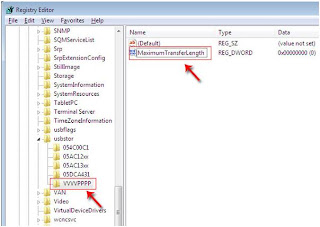
3) In the Registry, navigate to addresses in the path HKEY_LOCAL_MACHINE \ SYSTEM \ CurrentControlSet \ Control \ usbstor.

4) Now right click on USBSTOR and select NEW -- Key and put this key name VVVVPPPP


5) Now select VVVVPPPP and in the right pane right click and select New -- DWORD Value and name it MaximumTransferLength.
6) Now right click on Maximum Transfer Length and put value data 2097120.


7) That's It !! Now restart your computer and see the difference in copying data to usb.

like us on FACEBOOK

Get RS.10 RECHARGE FOR FREE(ANY NETWORK)

 GET FREE RECHARGE OF RS.10 FREE ANY NETWORK(WORKING FINE IN ANDHRAPRADESH)


hi guest, in previous post we have seen facebook magic codes and now i'm posting a trick to get Rs.10 free recharge just by sending a single SMS. Yes, you have heard right by sending the following SMS you'll get the free recharge with in 24hrs
STEP:1 Make sure that your mobile balance is minimum Rs.2 above  or STD sms offer

STEP:2 Just send the SMS as Below

           FLK 1 RAJU 23 RAYAMUNDRY to 9611555555
[<<>>]

Thats it you have done you wil be receive a confirmation sms.

LIKE OUR FACEBOOK PAGE 

 FEEL FREE TO COMMENT HERE

How To Hide Your Last Name In Facebook

How To Hide Your Last Name In Facebook


As we all know Facebook does not allow to write only first name, its only allowed in some selected countries like Indonesia, So here is the latest trick through which you can hide your last name easily.

Follow The Steps :

1) First you need Indonesian Proxy Servers.

2) Goto Firefox -- Options -- Advanced -- Network -- Settings -- Connection Settings -- And choose manual proxy configuration.

3) Now Tick " Use This Proxy Servers For All Protocols ".

4) Put this proxy and port
Http Proxy : 202.70.136.142
Port : 8080

5) Put 202.70.136.142 on No Proxy for Box.

6) Now goto your profile and remove last name then save it.

7) Bravo !! You Did It, Now Your Last Name Is Gone.
 

Facebook wonderful Magic Codes

Wonderful Facebook Magic Codes


You may have seen many Facebook status and posts which says you to re post the given post by removing some symbols in the code. When you do so the code changes  into text magically.


Below I Listed Some of the Codes.. Have fun..


1) Copy any one of the codes.

2) Paste them in your Facebook status or comments.

3) Then remove the "+" sign then press Enter.


Started With Our Site Name, Here Are The Codes.

@+[110871649075947:0] - Hackercracker007
@+[290169721005985:0]  -  I Love You
@+[263812423664428:0]  -  I am always with you
@+[172417706184835:0]  -  Ye Dosti hum nahi todenge
@+[291116797575161:0]  -  FriendS r EvErYtHiNg
@+[125710659238:0]  -  FRIENDS FOREVER
{@+[130183157042112:0]}  -  {EVER Green Friendship}
@+[145480518867077:0]  -  I Still Love
@+[117111614980889:page]  -  VERY FUNNY
@+[134282353283788:0]  -  Life is too short smile while you still have teeth
@+[276318582393095:0]  -  Chess mania


FEEL FREE TO COMMENT AND LIKE US ON FACEBOOK
.

Label 1