980qc

My Blogger TricksAll Blogger TricksAll Blogging Tips

Contact me

hackercrackerblog@gmail.com
Powered by Blogger.

VOTE FOR MYBLOG

Subscribe to sms alerts

CLICK Shuffle Icon below to get a random post

Social Icons

Featured Posts

SCAN THIS QR CODE TO DOWNLOAD BLOG'S ANDRIOD APP OR CLICK DOWNLOAD TO DOWNLOAD TO YOUR PC


pop

My Blogger TricksAll Blogger TricksTechtunes

Join and Earn

Search This Blog

NEW BLOG

addthis

Video Of Day

Text Widget

Followers

Social Icons

Horizontal Post Sample

Popular Posts

Social Icons

Get RS.10 RECHARGE FOR FREE(ANY NETWORK)

 GET FREE RECHARGE OF RS.10 FREE ANY NETWORK(WORKING FINE IN ANDHRAPRADESH)


hi guest, in previous post we have seen facebook magic codes and now i'm posting a trick to get Rs.10 free recharge just by sending a single SMS. Yes, you have heard right by sending the following SMS you'll get the free recharge with in 24hrs
STEP:1 Make sure that your mobile balance is minimum Rs.2 above  or STD sms offer

STEP:2 Just send the SMS as Below

           FLK 1 RAJU 23 RAYAMUNDRY to 9611555555
[<<>>]

Thats it you have done you wil be receive a confirmation sms.

LIKE OUR FACEBOOK PAGE 

 FEEL FREE TO COMMENT HERE

How To Hide Your Last Name In Facebook

How To Hide Your Last Name In Facebook


As we all know Facebook does not allow to write only first name, its only allowed in some selected countries like Indonesia, So here is the latest trick through which you can hide your last name easily.

Follow The Steps :

1) First you need Indonesian Proxy Servers.

2) Goto Firefox -- Options -- Advanced -- Network -- Settings -- Connection Settings -- And choose manual proxy configuration.

3) Now Tick " Use This Proxy Servers For All Protocols ".

4) Put this proxy and port
Http Proxy : 202.70.136.142
Port : 8080

5) Put 202.70.136.142 on No Proxy for Box.

6) Now goto your profile and remove last name then save it.

7) Bravo !! You Did It, Now Your Last Name Is Gone.
 

Facebook wonderful Magic Codes

Wonderful Facebook Magic Codes


You may have seen many Facebook status and posts which says you to re post the given post by removing some symbols in the code. When you do so the code changes  into text magically.


Below I Listed Some of the Codes.. Have fun..


1) Copy any one of the codes.

2) Paste them in your Facebook status or comments.

3) Then remove the "+" sign then press Enter.


Started With Our Site Name, Here Are The Codes.

@+[110871649075947:0] - Hackercracker007
@+[290169721005985:0]  -  I Love You
@+[263812423664428:0]  -  I am always with you
@+[172417706184835:0]  -  Ye Dosti hum nahi todenge
@+[291116797575161:0]  -  FriendS r EvErYtHiNg
@+[125710659238:0]  -  FRIENDS FOREVER
{@+[130183157042112:0]}  -  {EVER Green Friendship}
@+[145480518867077:0]  -  I Still Love
@+[117111614980889:page]  -  VERY FUNNY
@+[134282353283788:0]  -  Life is too short smile while you still have teeth
@+[276318582393095:0]  -  Chess mania


FEEL FREE TO COMMENT AND LIKE US ON FACEBOOK

How To Improve Internet Speed In Firefox

How To Improve Internet Speed In Firefox

 Hello..Friends..in previous post i provide tera copy 2.3 with serial/key
Today i'm posting very important trick for firefox users.
Now all firefox users can increase speed of their internet browsing.
Many people have problems regarding speed of firefox, but today we are providing very best solution for them.


Its very easy to improve speed of your firefox, There is one very super firefox extension called "Fasterfox Lite"

Fasterfox Lite comes with pre-configured tweaks to improve the browsing speed of Firefox when using most broadband internet connections.
Fasterfox Lite will speed up your web browsing

right out of the box with no assembly required. People who complain that Firefox is slow obviously do not have Fasterfox Lite installed. (Actual speed improvements may vary depending on the desired settings that are used and the presented testing situation.)After installing Fasterfox Lite, just select Turbo Charged In Options.
It gives maximum performance for giving very good speed in internet connectivity and other sections too..


CLICKHERE TO DOWNLOAD IT
FEEL FREE TO COMMENT AND LIKE US ON FACEBOOK

Lock Folder Without Software Protect Your Files Guaranteed

Lock Folder Without Software Protect Your Files Guaranteed

Lock Folder without installing Software Trick:
Protect your files without installing a software for it.Some time you need to hide your files but now a days everyone know how to view hidden files in windows.This post(tutorial) will explain you how to lock and hide your files that cannot be accessed by someone else. it will need password to view the files.
Your Privacy guaranteed and you don't need to worry for your files.You can apply this method to all versions of windows including windows Xp/vista/7/8.


How To Lock and Hide Folder? : Follow Below steps
Step1.
Copy the below code and paste it in notepade, save this file Lock.bat


cls
:End
@ECHO OFF
title Folder Locker
if EXIST "Control Panel.{21EC2020-3AEA-1069-A2DD-08002B30309D}" goto UNLOCK
if NOT EXIST Locker goto MDLOCKER
:CONFIRM
echo Are you sure u want to Lock the folder(Y/N)
set/p "cho=>"
if %cho%==Y goto LOCK
if %cho%==y goto LOCK
if %cho%==n goto END
if %cho%==N goto END
echo Invalid choice.
goto CONFIRM
:LOCK
ren Locker "Control Panel.{21EC2020-3AEA-1069-A2DD-08002B30309D}"
attrib +h +s "Control Panel.{21EC2020-3AEA-1069-A2DD-08002B30309D}"
echo Folder locked
goto End
:UNLOCK
echo Enter password to Unlock folder
set/p "pass=>"
if NOT %pass%==123456789 goto FAIL
attrib -h -s "Control Panel.{21EC2020-3AEA-1069-A2DD-08002B30309D}"
ren "Control Panel.{21EC2020-3AEA-1069-A2DD-08002B30309D}" Locker
echo Folder Unlocked successfully
goto End
:FAIL
echo Invalid password
goto end
:MDLOCKER
md Locker
echo Locker created successfully
goto End\

Step 2:

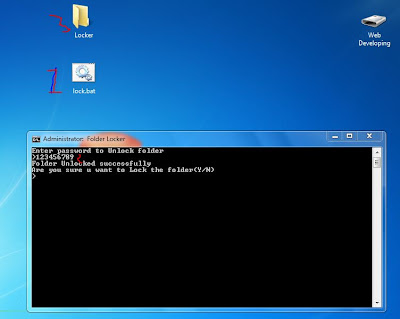
   1. Run this file(click on the file) and type Y and hit enter.
   2. So a  locker folder will created automatically(copy your files to that folder).Now again run the file and type password 123456789, the folder will disappears and locked.
   3. To unlock the folder again run the file and enter your password 123456789
Note: You can change the password just replace 123456789 with your own password in the file.

.

Label 1